
Geschäftskonten für globale Transaktionen.
Unsere Geschäftskonten ermöglichen nahtlose Geldtransfers weltweit – für Zahlungseingänge und -ausgänge.

Für globale Unternehmen.
Wir bedienen globale Unternehmensstrukturen – einschliesslich ausländischer Gesellschaften mit komplexen Beteiligungs- und Eigentumsverhältnissen.
Bivial ist in mehr als 160 Ländern verfügbar, unabhängig von Unternehmensgrösse und -komplexität.
Remote-Onboarding.
Eröffnen Sie ein Geschäftskonto remote und bequem von überall aus. Unser Team begleitet Sie effizient per Video durch das Onboarding – so unkompliziert wie möglich.
Während des Onboardings können Sie Fragen stellen und erhalten schnell und unkompliziert Antwort. Unser Team steht für erstklassigen Kundenservice!
Ein umfassendes Dashboard.
Konzerne können mehrere Konten mit individuellen Zugriffsrechten über ein einziges Dashboard verwalten.
Sie steuern, welche Nutzer auf welche Funktionen zugreifen können und unter welchen Bedingungen sie auf einen Corporate Account zugreifen können.
In der Schweiz geschützt.
Wir bieten IBAN-Konten in mehreren Währungen, gesichert bei einer Schweizer Bank, mit transparenten Wechselkursen, schnellen Auszahlungen und nahtlosem Zugang zu globalen Märkten.
Weltweit bezahlen und bezahlt werden.
Senden und empfangen Sie Zahlungen weltweit – mühelos. Bivial unterstützt Unternehmen mit globalem Kundenstamm dabei, reibungslos zu arbeiten.
Integrieren & automatisieren.
Unsere Payments-API lässt sich flexibel in Ihre bestehenden Tools und Systeme integrieren.
Die API-Integration von Bivial ermöglicht es Unternehmen, individuelle Lösungen für Massenzahlungen, internationale Zahlungen, virtuelle Debitkarten und mehr zu entwickeln.
'%3e%3cg%20clip-path='url(%23clip1_6482_154)'%3e%3cg%20clip-path='url(%23clip2_6482_154)'%3e%3cpath%20d='M9%2010.8175C9.49311%2010.8175%209.91932%2010.6378%2010.2785%2010.2785C10.6378%209.91932%2010.8175%209.49311%2010.8175%209C10.8175%208.50688%2010.6378%208.08069%2010.2785%207.72144C9.91932%207.36218%209.49311%207.18256%209%207.18256C8.50688%207.18256%208.08068%207.36218%207.72144%207.72144C7.36218%208.08069%207.18256%208.50688%207.18256%209C7.18256%209.49311%207.36218%209.91932%207.72144%2010.2785C8.08068%2010.6378%208.50688%2010.8175%209%2010.8175ZM9%2019.8175C9.49311%2019.8175%209.91932%2019.6378%2010.2785%2019.2785C10.6378%2018.9193%2010.8175%2018.4931%2010.8175%2018C10.8175%2017.5069%2010.6378%2017.0807%2010.2785%2016.7215C9.91932%2016.3622%209.49311%2016.1825%209%2016.1825C8.50688%2016.1825%208.08068%2016.3622%207.72144%2016.7215C7.36218%2017.0807%207.18256%2017.5069%207.18256%2018C7.18256%2018.4931%207.36218%2018.9193%207.72144%2019.2785C8.08068%2019.6378%208.50688%2019.8175%209%2019.8175ZM9%2028.8175C9.49311%2028.8175%209.91932%2028.6378%2010.2785%2028.2785C10.6378%2027.9193%2010.8175%2027.4931%2010.8175%2027C10.8175%2026.5069%2010.6378%2026.0807%2010.2785%2025.7215C9.91932%2025.3622%209.49311%2025.1825%209%2025.1825C8.50688%2025.1825%208.08068%2025.3622%207.72144%2025.7215C7.36218%2026.0807%207.18256%2026.5069%207.18256%2027C7.18256%2027.4931%207.36218%2027.9193%207.72144%2028.2785C8.08068%2028.6378%208.50688%2028.8175%209%2028.8175ZM3.63488%2036C2.59912%2036%201.73437%2035.6531%201.04063%2034.9593C0.346875%2034.2656%200%2033.4009%200%2032.3651V3.63488C0%202.59912%200.346875%201.73437%201.04063%201.04063C1.73437%200.346875%202.59912%200%203.63488%200H26.0483L36%209.95172V32.3651C36%2033.4009%2035.6531%2034.2656%2034.9593%2034.9593C34.2656%2035.6531%2033.4009%2036%2032.3651%2036H3.63488ZM3.63488%2033.75H32.3651C32.769%2033.75%2033.1009%2033.6202%2033.3608%2033.3608C33.6202%2033.1009%2033.75%2032.769%2033.75%2032.3651V11.25H24.75V2.25H3.63488C3.231%202.25%202.89912%202.37975%202.63925%202.63925C2.37975%202.89912%202.25%203.231%202.25%203.63488V32.3651C2.25%2032.769%202.37975%2033.1009%202.63925%2033.3608C2.89912%2033.6202%203.231%2033.75%203.63488%2033.75Z'%20fill='%23121212'/%3e%3c/g%3e%3c/g%3e%3c/g%3e%3cdefs%3e%3cclipPath%20id='clip0_6482_154'%3e%3crect%20width='36'%20height='36'%20fill='white'/%3e%3c/clipPath%3e%3cclipPath%20id='clip1_6482_154'%3e%3crect%20width='36'%20height='36'%20fill='white'/%3e%3c/clipPath%3e%3cclipPath%20id='clip2_6482_154'%3e%3crect%20width='36'%20height='36'%20fill='white'/%3e%3c/clipPath%3e%3c/defs%3e%3c/svg%3e)
Finanzreporting und Reconciliation
'%3e%3cg%20clip-path='url(%23clip1_6482_161)'%3e%3cpath%20d='M16.8077%2033.75V31.8281H29.4869C29.8064%2031.8281%2030.0829%2031.7296%2030.3164%2031.5326C30.5499%2031.3353%2030.6667%2031.0765%2030.6667%2030.7562V17.5174C30.6667%2013.9177%2029.3465%2010.9111%2026.7064%208.4975C24.0659%206.0843%2020.9137%204.8777%2017.25%204.8777C13.5863%204.8777%2010.4342%206.0843%207.79363%208.4975C5.15348%2010.9111%203.83332%2013.9177%203.83332%2017.5174V28.4279H2.87497C2.09107%2028.4279%201.41593%2028.1623%200.849525%2027.6312C0.2832%2027.1005%200%2026.4421%200%2025.656V22.0338C0%2021.4597%200.186075%2020.9505%200.558225%2020.5059C0.930675%2020.061%201.38353%2019.6994%201.9167%2019.4209L1.9497%2017.0595C2.0088%2015.0537%202.46165%2013.1959%203.30818%2011.486C4.1547%209.77587%205.26905%208.28758%206.6513%207.02105C8.03355%205.75453%209.63937%204.76782%2011.4688%204.06087C13.2983%203.35362%2015.2254%203%2017.25%203C19.2746%203%2021.1999%203.35362%2023.0259%204.06087C24.8515%204.76782%2026.4574%205.7528%2027.8434%207.01572C29.2291%208.27842%2030.3436%209.7647%2031.1866%2011.4745C32.0293%2013.1846%2032.4838%2015.0424%2032.5503%2017.0479L32.5833%2019.3619C33.0919%2019.6008%2033.5385%2019.9224%2033.9231%2020.3266C34.3077%2020.7306%2034.5%2021.2159%2034.5%2021.7825V25.9443C34.5%2026.5109%2034.3077%2026.9964%2033.9231%2027.4006C33.5385%2027.8045%2033.0919%2028.126%2032.5833%2028.3649V30.7562C32.5833%2031.5916%2032.2818%2032.2993%2031.6786%2032.8794C31.0753%2033.4598%2030.3447%2033.75%2029.4869%2033.75H16.8077ZM12.2369%2021.3318C11.8415%2021.3318%2011.497%2021.1969%2011.2034%2020.9272C10.9098%2020.6572%2010.763%2020.3239%2010.763%2019.9274C10.763%2019.5305%2010.9098%2019.1911%2011.2034%2018.9093C11.497%2018.6271%2011.8415%2018.486%2012.2369%2018.486C12.6328%2018.486%2012.9774%2018.6271%2013.271%2018.9093C13.5646%2019.1911%2013.7113%2019.5305%2013.7113%2019.9274C13.7113%2020.3239%2013.5646%2020.6572%2013.271%2020.9272C12.9774%2021.1969%2012.6328%2021.3318%2012.2369%2021.3318ZM22.2631%2021.3318C21.8672%2021.3318%2021.5226%2021.1969%2021.229%2020.9272C20.9354%2020.6572%2020.7887%2020.3239%2020.7887%2019.9274C20.7887%2019.5305%2020.9354%2019.1911%2021.229%2018.9093C21.5226%2018.6271%2021.8672%2018.486%2022.2631%2018.486C22.6586%2018.486%2023.003%2018.6271%2023.2966%2018.9093C23.5902%2019.1911%2023.737%2019.5305%2023.737%2019.9274C23.737%2020.3239%2023.5902%2020.6572%2023.2966%2020.9272C23.003%2021.1969%2022.6586%2021.3318%2022.2631%2021.3318ZM7.1247%2018.2789C6.95032%2015.4009%207.87433%2012.9481%209.8967%2010.9205C11.9191%208.8926%2014.4022%207.87867%2017.3458%207.87867C19.8202%207.87867%2022.0127%208.62343%2023.9234%2010.1129C25.834%2011.6023%2027.0006%2013.5592%2027.4232%2015.9837C24.8848%2015.9517%2022.5289%2015.3024%2020.3554%2014.0359C18.1819%2012.7694%2016.514%2011.0077%2015.3515%208.7507C14.8896%2010.9682%2013.9283%2012.9118%2012.4675%2014.5812C11.0066%2016.2504%209.22575%2017.4829%207.1247%2018.2789Z'%20fill='%23121212'/%3e%3c/g%3e%3c/g%3e%3cdefs%3e%3cclipPath%20id='clip0_6482_161'%3e%3crect%20width='36'%20height='36'%20fill='white'/%3e%3c/clipPath%3e%3cclipPath%20id='clip1_6482_161'%3e%3crect%20width='36'%20height='36'%20fill='white'/%3e%3c/clipPath%3e%3c/defs%3e%3c/svg%3e)
Sprechen Sie mit echten Menschen und erhalten Sie schnell Antworten
'%3e%3cg%20clip-path='url(%23clip1_6482_166)'%3e%3cg%20clip-path='url(%23clip2_6482_166)'%3e%3cpath%20d='M48.1944%2035.4818H39.1836L44.8196%200.632812H53.83L48.1944%2035.4818Z'%20fill='%23121212'/%3e%3cpath%20d='M80.8581%201.48366C79.0808%200.778539%2076.2618%200%2072.7762%200C63.8776%200%2057.6114%204.74515%2057.5728%2011.5293C57.4991%2016.5346%2062.0594%2019.3147%2065.4702%2020.9836C68.9563%2022.689%2070.1414%2023.8021%2070.1414%2025.3222C70.1059%2027.6568%2067.3244%2028.733%2064.7301%2028.733C61.1325%2028.733%2059.2049%2028.1782%2056.2756%2026.8793L55.089%2026.3225L53.8281%2034.1453C55.9415%2035.1082%2059.8351%2035.9626%2063.8776%2036C73.3324%2036%2079.4878%2031.3283%2079.5608%2024.0988C79.5967%2020.1317%2077.1887%2017.0919%2071.9971%2014.6079C68.8455%2013.0134%2066.9154%2011.9382%2066.9154%2010.3068C66.9524%208.8236%2068.5479%207.30447%2072.1055%207.30447C75.0349%207.23006%2077.1871%207.9342%2078.8177%208.63882L79.6327%209.00887L80.8581%201.48366Z'%20fill='%23121212'/%3e%3cpath%20d='M92.8358%2023.136C93.5778%2021.134%2096.4332%2013.3855%2096.4332%2013.3855C96.3954%2013.46%2097.1734%2011.3466%2097.6186%2010.0492L98.2481%2013.052C98.2481%2013.052%2099.9551%2021.3937%20100.326%2023.136C98.9172%2023.136%2094.6156%2023.136%2092.8358%2023.136ZM103.958%200.632812H96.989C94.8395%200.632812%2093.2064%201.26254%2092.2792%203.52424L78.8945%2035.4812H88.349C88.349%2035.4812%2089.9058%2031.1801%2090.2403%2030.2537C91.2773%2030.2537%20100.476%2030.2537%20101.809%2030.2537C102.069%2031.4773%20102.885%2035.4812%20102.885%2035.4812H111.228L103.958%200.632812Z'%20fill='%23121212'/%3e%3cpath%20d='M31.6572%200.632812L22.8325%2024.3964L21.8682%2019.5769C20.2368%2014.0158%2015.1201%207.97375%209.41016%204.96947L17.4931%2035.4447H27.0219L41.1853%200.632812H31.6572Z'%20fill='%23121212'/%3e%3cpath%20d='M14.638%200.632812H0.140503L-0.0078125%201.33694C11.3012%204.22887%2018.7909%2011.1997%2021.8682%2019.5784L18.7166%203.56219C18.1977%201.33645%2016.6031%200.706231%2014.638%200.632812Z'%20fill='%23121212'/%3e%3c/g%3e%3c/g%3e%3c/g%3e%3cdefs%3e%3cclipPath%20id='clip0_6482_166'%3e%3crect%20width='111.5'%20height='36'%20fill='white'/%3e%3c/clipPath%3e%3cclipPath%20id='clip1_6482_166'%3e%3crect%20width='111.5'%20height='36'%20fill='white'/%3e%3c/clipPath%3e%3cclipPath%20id='clip2_6482_166'%3e%3crect%20width='111.512'%20height='36'%20fill='white'%20transform='translate(-0.0078125)'/%3e%3c/clipPath%3e%3c/defs%3e%3c/svg%3e)
Visa Corporate Debit Cards
'%3e%3cg%20clip-path='url(%23clip1_6482_176)'%3e%3cg%20clip-path='url(%23clip2_6482_176)'%3e%3cpath%20d='M18%2036C14.3749%2036%2011.1258%2035.0273%208.25277%2033.0817C5.37972%2031.1366%203.22308%2028.5196%201.78284%2025.2311V31.154H0V22.154H8.91421V23.954H3.19886C4.35087%2027.0371%206.28169%2029.5155%208.99131%2031.3893C11.7012%2033.2631%2014.7042%2034.2%2018%2034.2C20.137%2034.2%2022.1445%2033.8129%2024.0224%2033.0385C25.9001%2032.2643%2027.5536%2031.1958%2028.9832%2029.8332C30.4131%2028.4706%2031.5743%2026.853%2032.4668%2024.9804C33.3594%2023.1075%2033.8742%2021.0807%2034.0112%2018.9H35.7941C35.6797%2021.2838%2035.1328%2023.5141%2034.1535%2025.5911C33.1741%2027.6679%2031.8901%2029.4795%2030.3016%2031.0257C28.7131%2032.5719%2026.8616%2033.7875%2024.7472%2034.6725C22.633%2035.5575%2020.384%2036%2018%2036ZM17.0809%2029.9079V27.706C15.8674%2027.4223%2014.8338%2026.936%2013.9801%2026.2472C13.1265%2025.5583%2012.4459%2024.5977%2011.9383%2023.3653L13.5086%2022.68C14.0024%2023.7945%2014.6624%2024.6536%2015.4884%2025.2572C16.3148%2025.8605%2017.2411%2026.1621%2018.2675%2026.1621C19.3166%2026.1621%2020.299%2025.8836%2021.2144%2025.3264C22.1296%2024.7691%2022.5873%2023.8569%2022.5873%2022.59C22.5873%2021.5814%2022.2576%2020.7898%2021.5982%2020.2153C20.9388%2019.6408%2019.6503%2018.997%2017.7325%2018.284C15.8196%2017.5847%2014.4601%2016.8462%2013.6544%2016.0686C12.8485%2015.2907%2012.4456%2014.2545%2012.4456%2012.96C12.4456%2011.8686%2012.8519%2010.8608%2013.6645%209.93644C14.4773%209.01212%2015.6458%208.43465%2017.1701%208.20395V6.0921H18.9191V8.20395C19.8515%208.27085%2020.7217%208.5962%2021.5296%209.18C22.3375%209.76381%2022.9506%2010.4885%2023.369%2011.354L21.8193%2011.97C21.4446%2011.3262%2020.9555%2010.7949%2020.352%2010.3761C19.7485%209.95734%2018.9942%209.74792%2018.0891%209.74792C16.9118%209.74792%2015.9685%2010.0536%2015.2589%2010.665C14.5494%2011.2764%2014.1945%2012.0414%2014.1945%2012.96C14.1945%2013.8786%2014.4676%2014.5859%2015.0138%2015.0817C15.5599%2015.578%2016.8159%2016.1723%2018.7818%2016.8647C20.9212%2017.6447%2022.3703%2018.4788%2023.1292%2019.3671C23.8881%2020.2557%2024.2676%2021.33%2024.2676%2022.59C24.2676%2023.4369%2024.1017%2024.1788%2023.7702%2024.8157C23.4389%2025.4526%2023.0108%2025.9804%2022.486%2026.3992C21.9617%2026.8183%2021.3782%2027.1415%2020.7357%2027.3685C20.0936%2027.5959%2019.4584%2027.7384%2018.8299%2027.796V29.9079H17.0809ZM0.205918%2017.1C0.365779%2014.6007%200.946835%2012.3069%201.94909%2010.2186C2.95164%208.13%204.25862%206.32415%205.87%204.80105C7.4814%203.27795%209.32707%202.097%2011.4071%201.2582C13.487%200.419401%2015.6847%200%2018%200C21.5564%200%2024.8056%200.978454%2027.7472%202.93535C30.6889%204.89225%2032.8455%207.5495%2034.2171%2010.9071V4.84605H36V13.846H27.0858V12.046H32.8012C31.7178%209.05532%2029.8155%206.6%2027.0943%204.68C24.3731%202.76%2021.3417%201.8%2018%201.8C15.9542%201.8%2013.9983%202.1756%2012.1323%202.9268C10.2659%203.678%208.60636%204.72335%207.15365%206.06285C5.70122%207.40235%204.51163%209.00852%203.58484%2010.8815C2.65777%2012.754%202.12574%2014.8269%201.98875%2017.1H0.205918Z'%20fill='%23121212'/%3e%3c/g%3e%3c/g%3e%3c/g%3e%3cdefs%3e%3cclipPath%20id='clip0_6482_176'%3e%3crect%20width='36'%20height='36'%20fill='white'/%3e%3c/clipPath%3e%3cclipPath%20id='clip1_6482_176'%3e%3crect%20width='36'%20height='36'%20fill='white'/%3e%3c/clipPath%3e%3cclipPath%20id='clip2_6482_176'%3e%3crect%20width='36'%20height='36'%20fill='white'/%3e%3c/clipPath%3e%3c/defs%3e%3c/svg%3e)
Sofortiger Währungsumtausch
So beantragen Sie online ein Geschäftskonto.
1.
Erstellen Sie ein Profil.
2.
Füllen Sie online das Antragsformular aus.
3.
Schliessen Sie das Onboarding mit unserem Team ab.
So fügen Sie Ihrem Geschäftskonto Währungen hinzu.
Schritt 1.
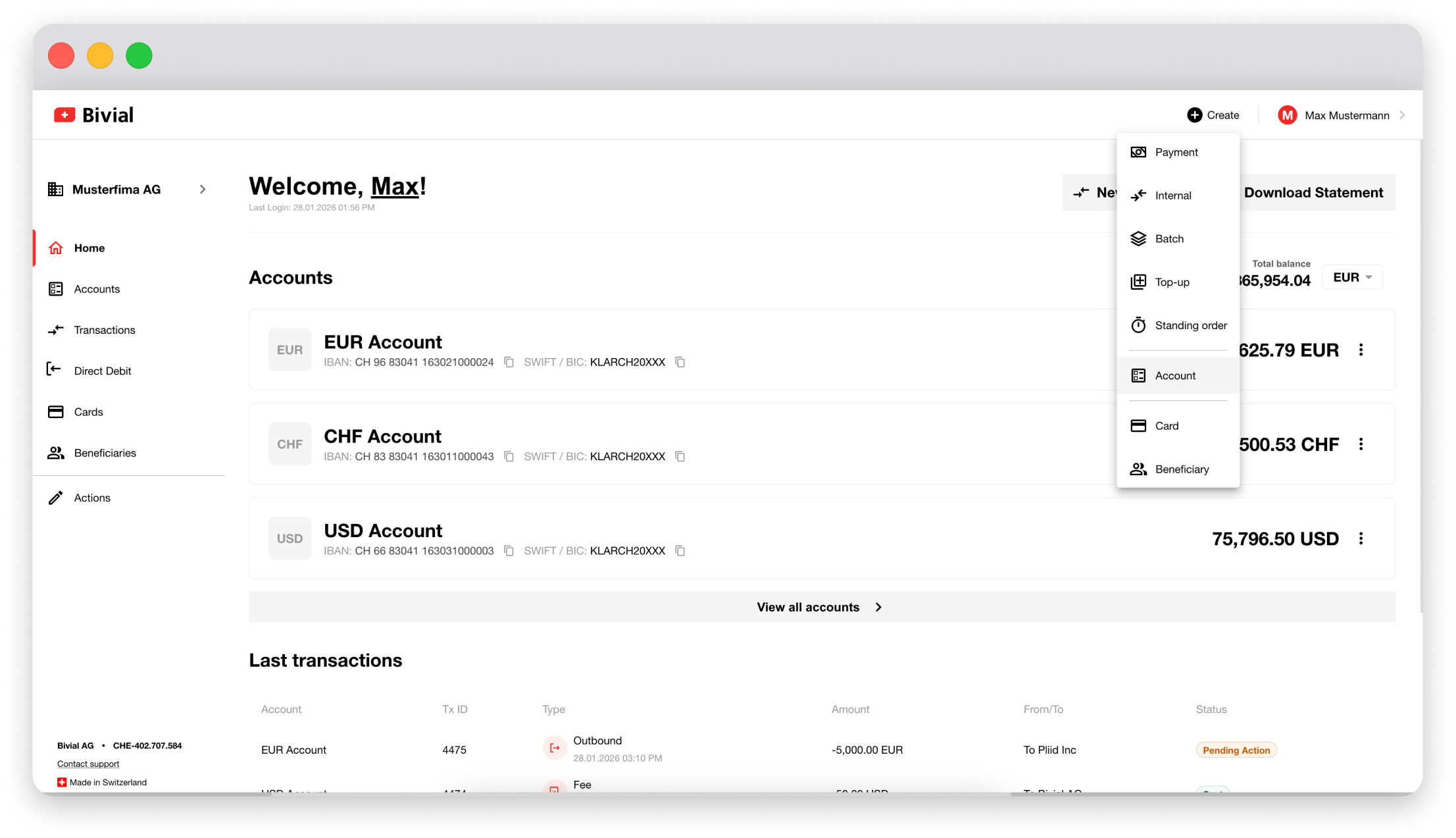
Klicken Sie in der oberen Menüleiste auf „Create“ und wählen Sie „Account“.
Schritt 2.
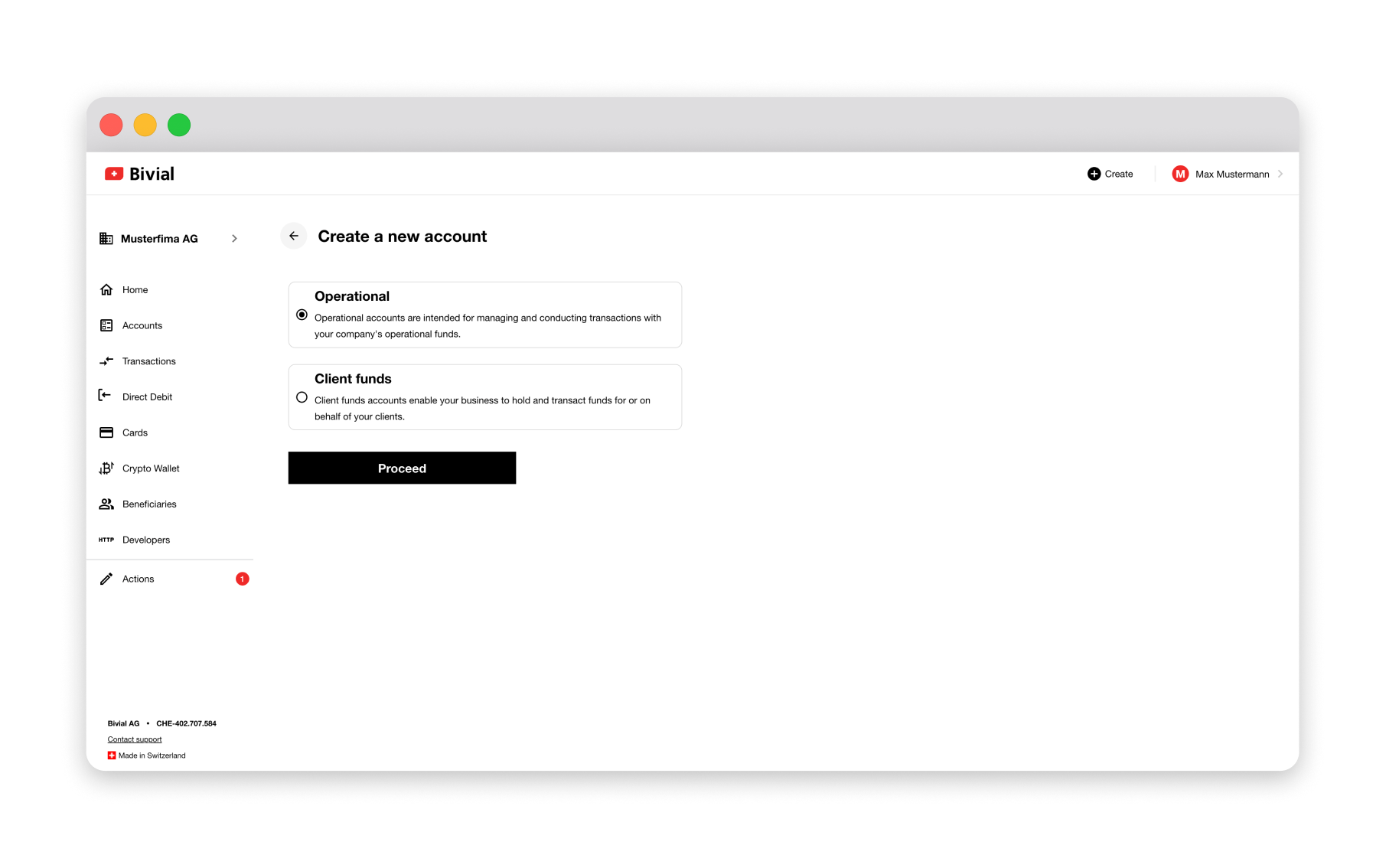
Wählen Sie den Kontotyp – „Operational“ oder „Client Funds Account“ – und klicken Sie auf „Proceed“.
Schritt 3.
Wählen Sie die gewünschte Währung aus.
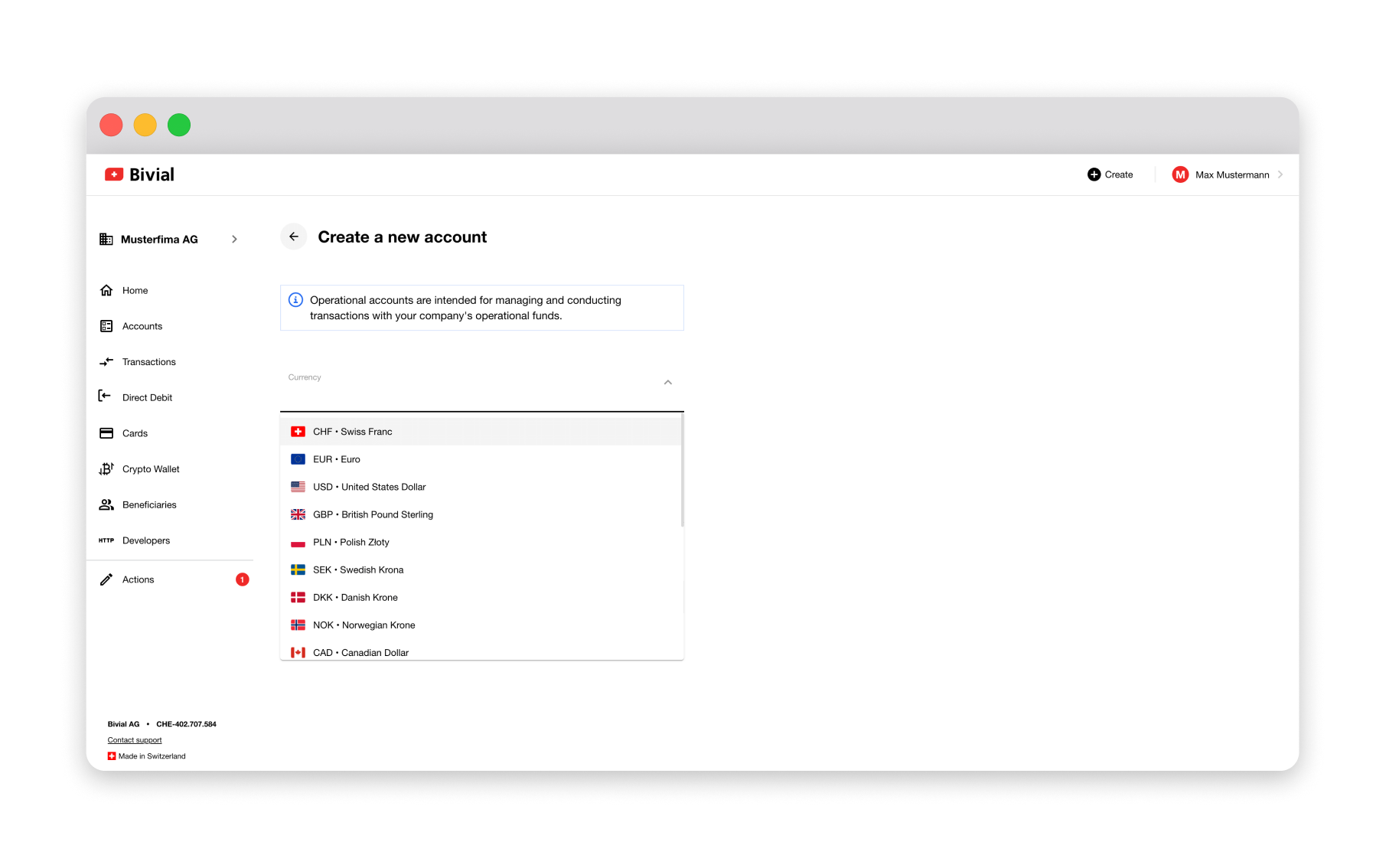
Verfügbare Währungen.

API-Integration.
Integrieren Sie Bivial in Ihre Website oder App, um Zahlungen in mehreren Währungen akzeptieren zu können.
Mehr erfahren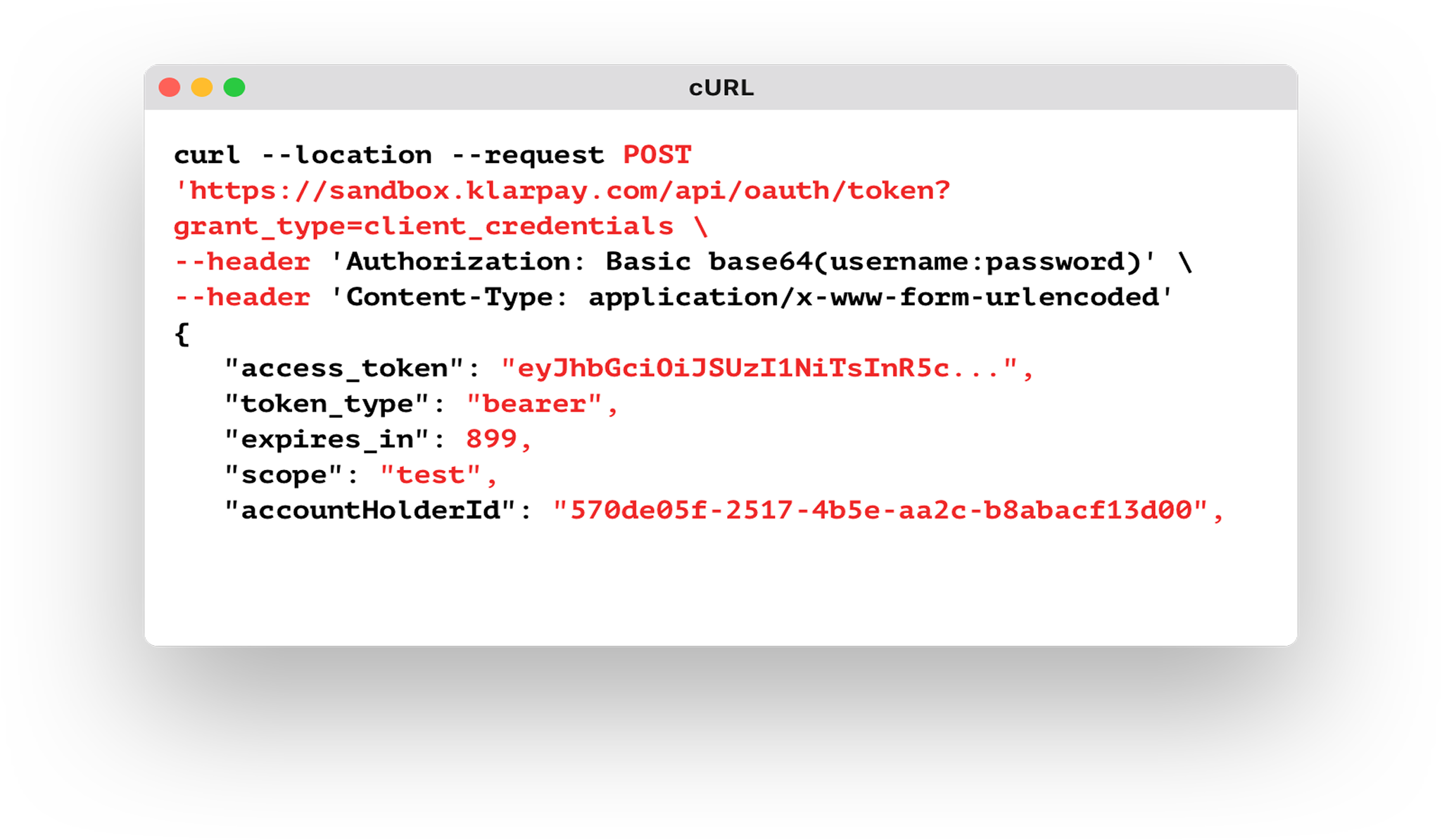
FAQs.
Was ist ein Geschäftskonto und wie unterscheidet es sich von einem Privatkonto?
Geschäftskonten werden auf den Namen eines Unternehmens eröffnet und dienen der Verwaltung der Firmengelder. Privatkonten hingegen lauten auf eine Privatperson und werden zur Verwaltung persönlicher Finanzen genutzt. Geschäftskonten verfügen über speziell auf den unternehmerischen Einsatz zugeschnittene Funktionen wie mehrstufige Zugriffskontrollen, Währungskonvertierung und Integrationen mit Drittanbieter-Software. Privatkonten bieten in der Regel nur Basisfunktionen für die persönliche Finanzverwaltung.
Wer kann ein Bivial-Geschäftskonto eröffnen?
Registrierte ausländische Unternehmen mit einem Jahresumsatz von über CHF 2 Mio. können ein Bivial-Geschäftskonto eröffnen. Auch Freischaffende und Start-ups mit einem Umsatz von weniger als CHF 2 Mio. können kleine Geschäftskonten zum Senden und Empfangen von Zahlungen eröffnen. Mit den erforderlichen Unterlagen ist die Kontoeröffnung schnell und unkompliziert.
Wie eröffne ich ein Bivial-Geschäftskonto?
Sie können ein Bivial-Geschäftskonto online eröffnen, indem Sie das Antragsformular ausfüllen und die erforderlichen Unterlagen einreichen. Der Prozess ist schnell und unkompliziert – starten Sie noch heute.
Ist ein Bivial-Geschäftskonto ein klassisches Bankkonto?
Nein, ein Bivial-Geschäftskonto ist kein klassisches Geschäftskonto. Es ist ein rein digitales Konto, mit dem Unternehmen ihre Finanzen verwahren und verwalten. Bivial ist ein Finanzinstitut, das mit Schweizer Bankinstituten zusammenarbeitet, um Finanzdienstleistungen anzubieten – mit demselben Einlegerschutz, den auch Inhaber Schweizer Bankkonten geniessen. Unsere Plattform vereint das Vertrauen und die Verlässlichkeit Schweizer Banken mit den innovativen, massgeschneiderten Funktionen eines Fintech-Unternehmens.
Kann das Konto remote eröffnet und verwaltet werden?
Ja, Sie können Ihr Bivial-Konto vollständig remote eröffnen und verwalten. Unser Team begleitet Sie per Live-Video durch den Onboarding-Prozess – unabhängig von Ihrem Standort.
Welche Währungen stehen für ein Bivial-Geschäftskonto zur Verfügung?
Mit einem Bivial-Geschäftskonto senden und empfangen Sie Geld in über einem Dutzend Währungen, darunter CHF, EUR, USD, GBP, AED, AUD, CAD, DKK, HKD, HUF, JPY, MXN, NOK, PLN, SEK, TRY, ZAR, CZK und SGD. Ein Bivial-Geschäftskonto ermöglicht den nahtlosen Geldtransfer weltweit.
Kann ich mit einem Dashboard mehrere Unternehmen und Benutzer verwalten?
Ja, Sie können mehrere Konten und Benutzer über Ihr einziges Bivial Dashboard verwalten. Wir bieten eine zentrale Plattform für die Verwaltung der Unternehmensfinanzen und die strukturierte Dokumentation Ihrer Finanzdaten.
Welche Zahlungsmethoden unterstützt Bivial?
Für eingehende Transaktionen umfassen die unterstützten Zahlungsmethoden SEPA-, SWIFT- und SIC-Überweisungen sowie Karten und weitere digitale Wallets wie Alipay. Für ausgehende Zahlungen werden SEPA-, SWIFT-, SIC- und TARGET2-Überweisungen, Visa-/Mastercard-Karten sowie Wallets wie Alipay und PayPal unterstützt.
Kann ich mein Konto in externe Software integrieren oder Transaktionen automatisieren?
Ja, Bivial bietet eine API-Integration, damit Unternehmen unsere Plattform mit externer Software verbinden können. Zahlungsanweisungen können zudem über das SWIFT-Messaging-System gesendet oder als Batch-Datei hochgeladen werden – statt jede Transaktion manuell zu erfassen.